EH Ch - 3
Exploiting the Windows OS
- Securing Windows can be difficult for beginners.
- Backward compatibility keeps older flaws alive.
- Large market share makes it a prime target for attackers.
--
Why Windows Faces More Risk
- Older applications must remain supported.
- Legacy issues sometimes remain in the system.
- Most attacks succeed through applications, not the OS itself.
--
Workstation vs Server
- Both versions are almost identical.
- Servers support more users, connections, and processes.
- Security concepts apply to both equally.
--
Windows Attack Surface
- Even without apps, Windows manages many system functions:
- Networking
- Storage
- Memory
- Device communication
- Flaws in any area can be exploited.
--
SMB DoS Vulnerability (CVE-2022-32230)
- SMB handles file sharing.
- Malformed requests could cause system crashes.
- A system-level flaw not tied to any application.
--
Print Spooler Privilege Escalation (CVE-2022-38028)
- Print Spooler contained a privilege escalation flaw.
- Could grant SYSTEM-level access.
- Known exploit modules exist.
--
Drivers as an Exploitation Path
- Windows loads drivers during boot.
- Drivers interact directly with hardware.
- Malicious drivers can run with high privileges.
--
How Attackers Insert Malicious Drivers
- Install a malicious driver after gaining access.
- Overwrite an existing legitimate driver.
- Compromise the vendor and poison official update delivery (supply chain).
--
Supply Chain Attack Examples
- ASUS 2018 update attack compromised ~5,00,000 systems.
- SolarWinds 2020 update was modified to include a backdoor.
- Malicious NPM packages were downloaded thousands of times.
--
Exploiting Windows Networking
--
- Windows supports many network protocols.
- Each protocol can be misconfigured or flawed.
- Common targets include ARP, SNMP, SMB, and NetBIOS.
--
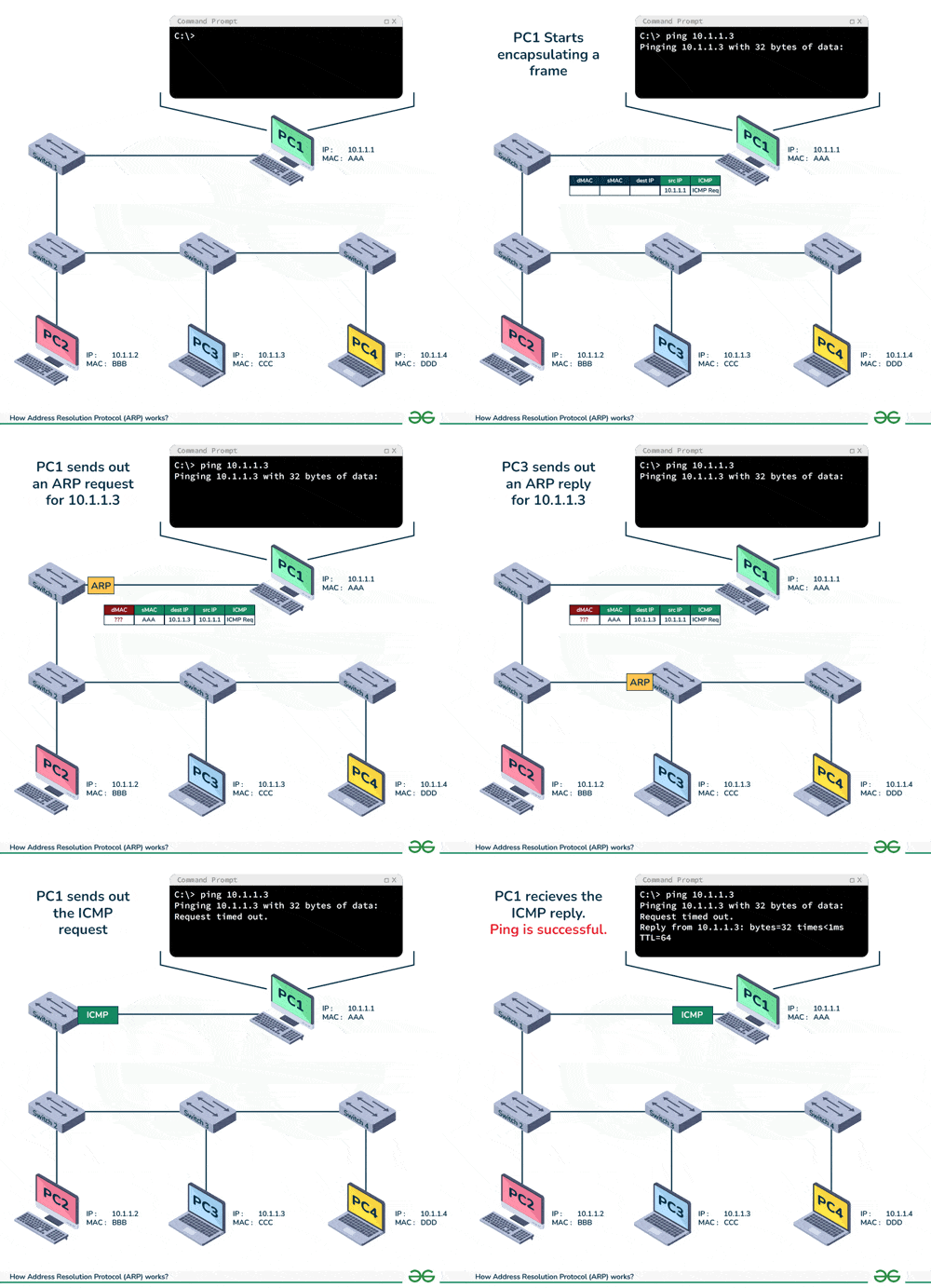
Address Resolution Protocol (ARP)
- Maps IP addresses to MAC addresses.
- Used so devices on a LAN can communicate.
- Switches store these mappings in a CAM table.
--
--
ARP Flood / MAC Flooding
- Attacker floods switch with fake ARP replies.
- CAM table becomes full.
- Switch starts sending traffic to all ports.
- Attacker can sniff all network traffic.
--
ARP Poisoning / Spoofing
- Attacker sends fake ARP replies to devices.
- Devices believe attacker is the gateway.
- Attacker becomes man-in-the-middle.
- Can intercept and modify traffic.
- Tools include Ettercap and Bettercap.
--
Simple Network Management Protocol (SNMP)
- Used to monitor devices (CPU, RAM, storage, services, etc.).
- Uses MIB files as agents.
- Manager sends queries using a community string.
- Default strings are often “public” or “private”.
- SNMP traffic is usually cleartext (except SNMPv3).
--
SNMP Attacks – Sniff and Capture
- Use a packet sniffer to catch SNMP traffic.
- Community strings can be extracted.
- Data such as routes, services, users, running processes can be gathered.
- Useful for reconnaissance.
--
SNMP Attacks – Impersonate Manager
- Send queries using correct community string.
- Extract system info directly from the device.
--
SNMP Attacks – Inject Data
- Exploit trust in the management system.
- Send fake or malformed monitoring data.
- Can mislead admins or trigger faults.
- Potential for buffer overflows or command injection.
--
Tools for SNMP Attacks
- Metasploit supports scanning, enumeration, brute forcing.
- Onesixtyone – SNMP scanner.
- Snmpcheck – gathers device info.
- Snmpblow – extracts configuration from Cisco devices.
- Snmpset – uploads modified device configurations.
- Snmpwalk – walks SNMP data using GETNEXT.
--
Defending Against SNMP Attacks
- Disable SNMP on unused systems.
- Change default community strings.
- Block access to ports 161 and 162 from unauthorized devices.
- Use SNMPv3 with authentication and encryption.
- Restrict SNMP users and views.
NetBIOS Overview
NetBIOS (Network Basic Input/Output System) enables communication between programs on computers within a local network.
Runs mainly on TCP port 139.
--
NetBIOS over TCP/IP (NetBT) ports:
- UDP 137 – Name services
- UDP 138 – Datagram services
- TCP 139 – Session services
--
What attackers can discover via enumeration: - Machines in a domain
- File & printer shares
- Usernames / passwords
- Groups & policies
NetBIOS Names
Each device has a unique NetBIOS name:
- 15-character main name (computer/domain/user)
- 1-byte hex suffix (identifies service type)
--
Common suffixes
| Name | Suffix | Service |
|---|---|---|
| Computer name | 00 | Workstation service |
| Domain name | 00 | Domain name |
| Computer name | 03 | Messenger service |
| Username | 03 | Messenger service |
| Computer name | 06 | RAS service |
| Computer name | 20 | File server service |
| Computer name | 21 | RAS client service |
| Domain name | 1B | Domain master browser |
| Domain name | 1C | Domain controllers |
| Domain name | 1D | Master browser |
| Domain name | 1E | Browser elections |
--
Understanding suffixes reveals valuable targets:
- Domain controllers: accounts, passwords, DNS info
- File servers: shares, internal data
NetBIOS Enumeration
Primary tool: nbtstat.exe
Displays name tables, caches, and sessions.
--
Commands
nbtstat -a <NetBIOS-name> nbtstat -A <IP-address>
--
Useful switches
- -a : Remote machine NetBIOS table (name)
- -A : Remote machine NetBIOS table (IP)
- -c : Name cache
- -n : Local NetBIOS names
- -s : Sessions → NetBIOS names
- -S : Sessions → IP addresses
--
Example
nbtstat -n
Returns the local NetBIOS name table, showing unique/group entries and services running.
Login Accounts
| Name | Type | Description |
|---|---|---|
| Administrator | Login Account | Full system control; cannot be deleted but can be renamed. |
| Default Account | Login Account | Default System-Managed Account (DSMA); disabled by default; used for multi-user-aware or user-agnostic programs. |
| Guest | Login Account | Very limited login account; deprecated in Windows 10+. |
| WDAGUtilityAccount | Login Account | Used by Windows Defender Application Guard to isolate Edge browser sessions. |
--
Security Principles
| Name | Type | Description |
|---|---|---|
| Authenticated Users | Security Principle | Basic rights for any authenticated session. |
| Everyone | Security Principle | Basic rights without needing authentication. |
| LOCAL SERVICE | Security Principle | Same access as standard Users; accesses network as null session (no credentials). |
| SYSTEM | Security Principle | Highest privilege; used by OS components like LSASS and SMSS before user login. |
--
Security Groups
| Name | Type | Description |
|---|---|---|
| Administrators | Security Group | Grants full administrative privileges; Administrator added by default. |
| Backup Operators | Security Group | Can access files regardless of permissions for backup/restore tasks. |
| Guests | Security Group | Very limited permissions; Guest account is the default member. |
--
Password Attack Paths
1. Exploit → Password Attack
- Attacker first finds and exploits a system vulnerability.
- After gaining access, they dump account/password hashes.
- Hashes are cracked offline.
- Once cracked, attacker can log in using multiple valid accounts.
- Here, exploit happens first, password cracking later.
--
2. Password Attack → Exploit
- Attacker starts with automated password guessing (brute force).
- Methods include:
- Dictionary attack – tries known password lists.
- Brute force algorithm – generates all possible combinations.
- If a password is found, attacker gains access.
- From there, they can dump hashes and escalate further.
- Here, password attack happens first, exploit later.
--
3. Social Engineering for Passwords
- Uses human manipulation instead of technical attacks.
- Phishing emails trick users into revealing credentials.
- Attacker uses stolen credentials for access and further exploitation.
Why Attackers Harvest Credentials
Attackers with admin-level access collect as many usernames and passwords as possible.
Credentials allow movement from one machine to entire networks, including financially valuable accounts.
Post-Exploitation Goal
Once inside:
- Expand access
- Install additional tools
- Pivot across systems
- Target high-value accounts
Credentials make this silent and effective.
Standalone Systems (Non-Domain)
On standalone Windows systems, account/password data is stored in:
- Security Accounts Manager (SAM) hive)
Registry:HKEY_LOCAL_MACHINE\SAM
Disk:C:\Windows\System32\config\SAM
Only SYSTEM can access it.
While running, the file is locked and requires special tools to dump.
Why Dumping SAM Matters
Even a single SAM file may contain:
- Reused passwords across multiple systems
- Credentials giving access to enterprise servers
- Keys for lateral movement
Weak password practices amplify this risk.
Active Directory Environments
In domain networks, credentials are stored in the NTDS database:
C:\Windows\NTDS\ntds.dit
Domain controllers maintain all domain account and password data.
Cached Domain Credentials
Windows clients store recent domain login hashes so users can log in offline.
Attackers dump these to:
- Log in without domain controller access
- Impersonate legitimate users
Why Credential Dumping Is Powerful
With valid credentials:
- Attackers blend in with normal user activity
- Escalation becomes easier
- Trust relationships are abused
- Detection becomes extremely hard
Standalone Systems: The Security Accounts Manager (SAM)
On a standalone system (not part of a Windows domain), user account and password data are stored locally in the Security Accounts Manager (SAM) registry hive.
--
- Registry Location:
HKEY_LOCAL_MACHINE\SAM - Disk File Location:
C:\windows\system32\config\SAM - Access Permissions: By default, only the SYSTEM user has permission to access this area.
- Accessing the File: While the machine is running, the physical SAM file is locked and requires specific tools to access or copy (pwdump).
- Potential for Enterprise Access: Even a standalone SAM can contain credentials that grant access to the wider enterprise domain, often due to user password reuse or weak IT policies.
Active Directory Domain: The NTDS.DIT Database
For systems that are part of an Active Directory (AD) domain, account and password information is maintained by the Domain Controller(s) in the Active Directory database.
--
- Database File:
ntds.dit - Default Location:
C:\windows\windowsds\ntds.dit - Configuration: The location can be changed during domain controller installation but is rarely customized.
Password Caching and Authentication
Windows clients that authenticate to a domain also cache password hashes to allow users to log on even when the Domain Controller is unavailable (e.g., a traveling laptop user).
--
- Benefit for Users: Enables local login access without immediate domain controller verification.
- Risk for Security: Cached credentials represent another target for attackers who can dump these hashes and attempt to crack or reuse them.
Key Post-Exploit Activity: Dumping SAM and NTDS.DIT
The process of extracting the SAM or the NTDS.DIT file is one of the most powerful steps for privilege escalation, as it yields hashes that can be used for Pass-the-Hash (PtH) attacks or to reveal plaintext passwords (if cracked).
--
- SAM Dumping: Effective for gaining local and potentially domain-wide access via reused passwords.
- NTDS.DIT Dumping: Yields the entire domain's password hash database, granting the attacker the keys to the kingdom.
LINUX OS HACKING
Linux Security
- The Misconception:
- Linux is often perceived as more secure due to a lower likelihood of common viruses and more difficult access to elevated privileges than Windows.
- The Reality:
- Linux is prone to many of the same security issues as Windows.
- Most vulnerabilities are related to configuration settings and installed applications, not the core OS.
- Security often depends on having the most recent kernel and patches applied.
--
- Server Market Share (2019 data):
- Windows OS: 72.1% of servers worldwide.
- Linux OS: 13.6% of servers worldwide.
Exploring the Linux File System
The Linux file system employs a hierarchical structure rooted at the / directory, which is the equivalent of the primary drive in Windows. Unlike Windows, Linux does not use drive letters (like C: or D:); instead, disks are referenced as volumes mounted at a specific point, beginning at the root (/)
--
Access and File Permissions
Permissions are granted to at least one of three categories:
- Owner: The creator of the file (automatic permission).
- Group: A collection of users that share access rights.
- Other: Everyone else on the system.
--
System Essentials and Core Binaries
/bin/and/usr/: Contain essential user command binaries and other user utilities/applications, respectively. Attackers look for vulnerable binaries here, while defenders ensure their integrity./sbin/: Holds system binaries used by the OS and administrators (e.g., commands for system administration and maintenance). Often targeted for privilege escalation.
--/lib/: Stores shared code libraries required by the operating system and applications. Vulnerabilities in these libraries can be exploited./boot/: Contains the static files for the bootloader, essential for system startup. Protecting this directory is critical for system integrity.
--
Configuration and System State
/etc/: The High-Value Target for configuration. It holds host-specific system configuration files (like network settings, password files, and service configs)./proc/and/sys/: Contain information about running processes and the system kernel's view of the hardware, respectively. Attackers read these to gather intelligence; defenders monitor them for unusual activity./var/: Stores variable data, including crucial log files in/var/log. Defenders rely on logs for forensics, while attackers may attempt to delete them for evasion.
--
User Data and Storage
/home/: Contains the personal files and directories of standard users. This is a common target for data theft./root/: The dedicated, highly secured home directory for the root user./mnt/and/media/: Used for mounting other filesystems (like network shares) and temporary/removable media (like USB drives), respectively. These are pathways for attackers to check for access to external resources or stage exfiltration.
--/tmp/: A location for temporary file storage, frequently used by attackers to stage malicious files or execution exploits./srv/: Stores data specifically for services offered by the system (e.g., website data, FTP files).
What is SUID?
SUID is a special permission assigned to an executable file that allows the user running it to execute the file with the permissions of the file's owner.
--
Common Use Case: If an application (like the passwd command) needs to make changes to a system-wide file (like /etc/shadow) but is run by a normal user, it is given the SUID permission. Since the owner is typically root, the binary executes with root privileges.
--
Vulnerability: If an SUID binary contains a vulnerability (like a buffer overflow or race condition), an attacker can exploit it to execute arbitrary commands with the owner's elevated privileges, often leading directly to root access.
sudo find / -type f -perm -04000 -ls
All passwords on linux stored in /etc/passwd