OS Chapter 1
Module 1: Introduction to Operating System
Syllabus
Introduction, System Components, Open-Source Operating Systems, Operating System Services, System Calls, Process Management- Process Structure, Process states, Types of Schedulers, Scheduling Criteria, Scheduling algorithms. Deadlock and Starvation- Principles of Deadlock, Deadlock Prevention, Deadlock Avoidance, Deadlock Detection and Recovery. Linux Environment, Fundamental Commands. System Shell and User Shells.
What is an Operating System?
A program that acts as an intermediary between a user of a computer and the computer hardware
Operating system goals:
- Execute user programs and make solving user problems easier
- Make the computer system convenient to use
- Use the computer hardware in an efficient manner
Computer System Structure
Computer system can be divided into four components:
- Hardware – provides basic computing resources: CPU, memory, I/O devices
- Operating system - Controls and coordinates use of hardware among various applications and users
- Application programs – define the ways in which the system resources are used to solve the computing problems of the users: Word processors, compilers, web browsers, database systems, video games
- Users: People, machines, other computers
--

What Operating Systems Do
- Users want convenience, ease of use and good performance
- Don’t care about resource utilization
- But shared computer such as mainframe or minicomputer must keep all users happy
--
- Users of dedicated systems such as workstations have dedicated resources but frequently use shared resources from servers.
- Handheld computers are resource-poor, optimized for usability and battery life.
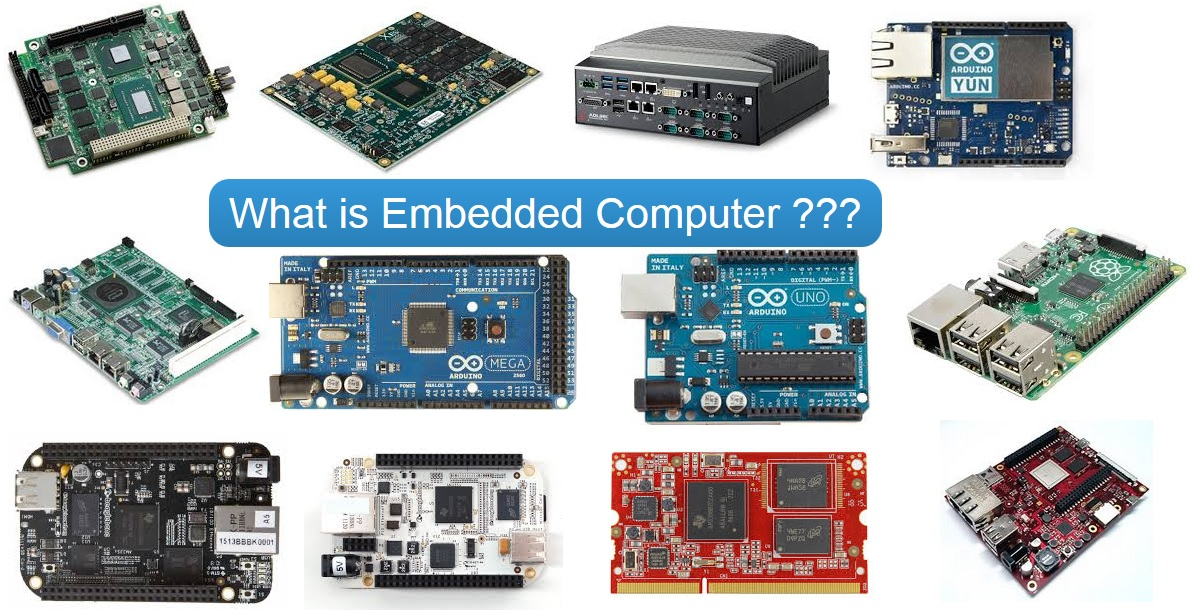
- Some computers have little or no user interface, such as embedded computers in devices and automobiles.
| ! 400 |
|---|
 |
Definition of OS
- OS is a resource allocator
- OS is a control program
“The one program running at all times on the computer” is the kernel.
Everything else is either a system program (ships with the operating system) , or an application program.
Computer Startup
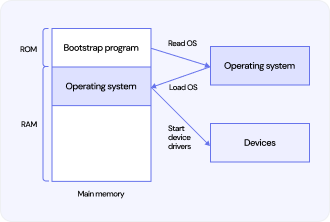
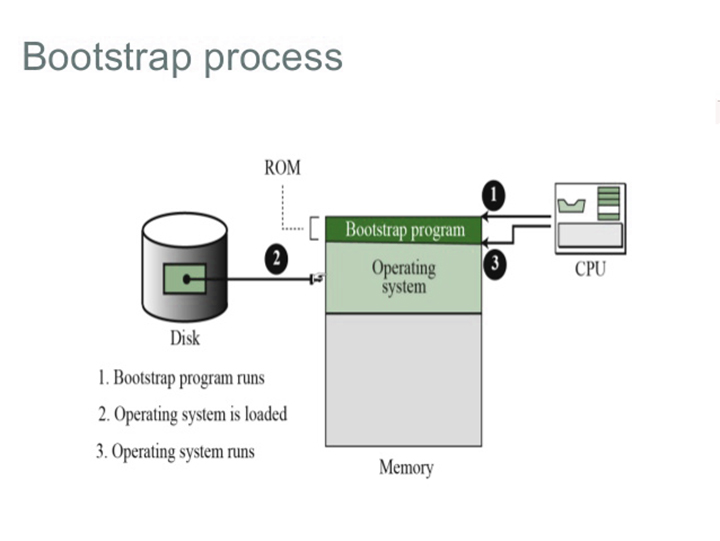
- Bootstrap program is loaded at power-up or reboot.
- Typically stored in ROM or EPROM, generally known as firmware.
- Initializes all aspects of the system.
- Loads the operating system kernel and starts execution.
--
Computer System Organization
- Computer-system operation:
- One or more CPUs and device controllers connect through a common bus, providing access to shared memory.
- Concurrent execution of CPUs and devices occurs, competing for memory cycles.
--

--
- I/O devices and the CPU can execute concurrently.
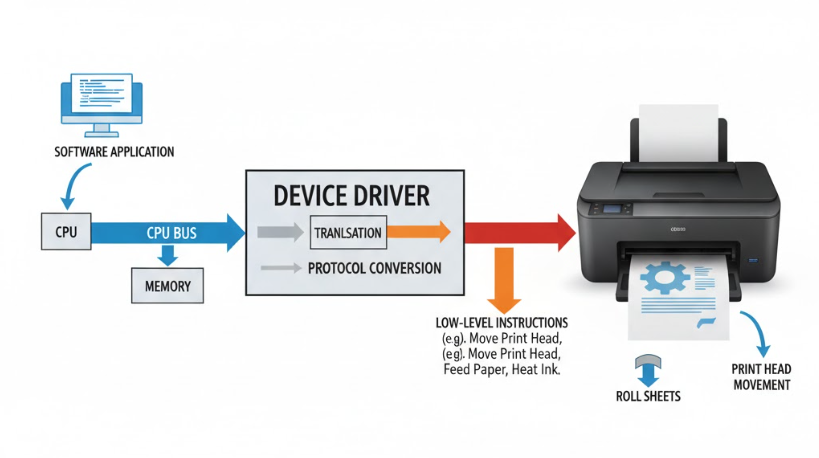
- Each device controller is responsible for a particular device type.
- Each device controller has a local buffer.
- CPU moves data from/to main memory to/from local buffers.
- I/O occurs from the device to the local buffer of the controller.
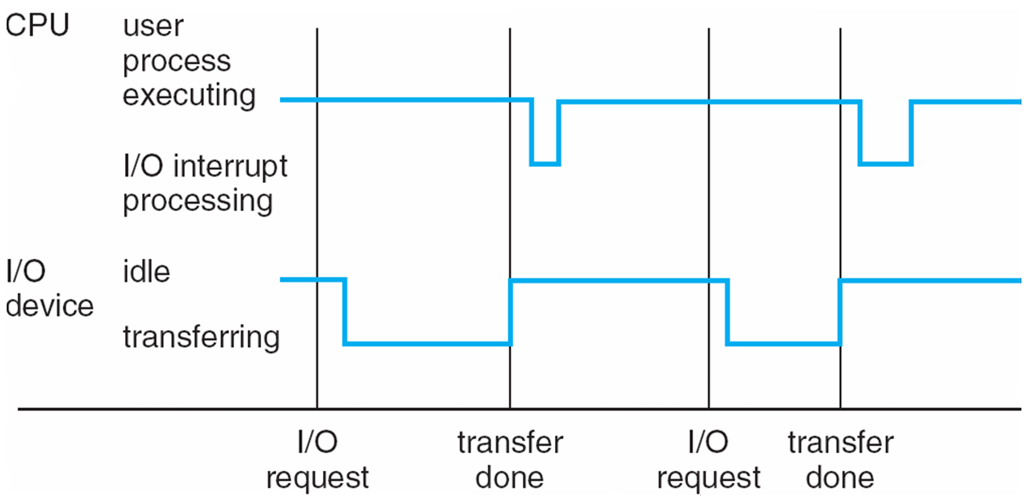
- The device controller informs the CPU that it has finished its operation by causing an interrupt.
--
--

--
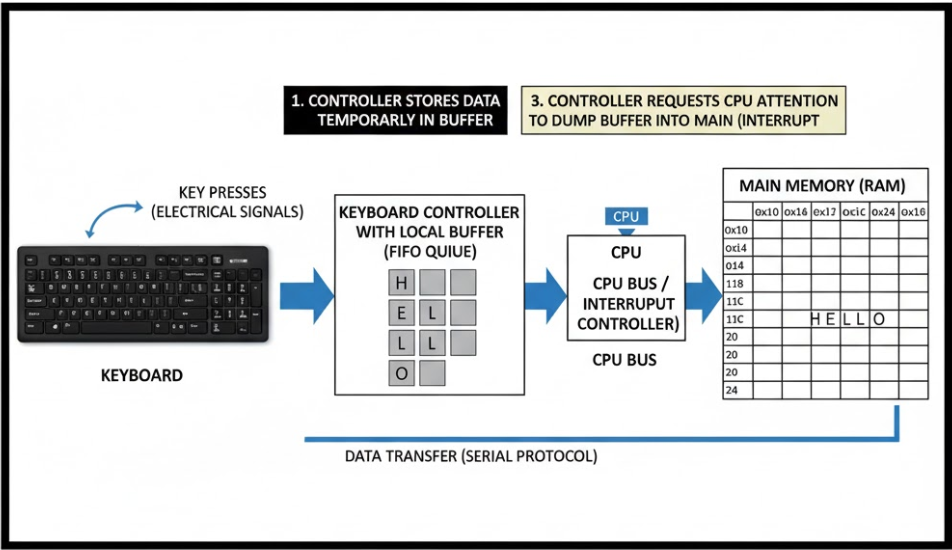
Interrupts
- Interrupt transfers control to the interrupt service routine (ISR), generally through the interrupt vector, which contains the addresses of all service routines.
- Interrupt architecture must save the address of the interrupted instruction.
- A trap or exception is a software-generated interrupt caused either by an error or a user request.
- An operating system is interrupt-driven.
--

--
Direct Memory Access (DMA)
- Used for high-speed I/O devices able to transmit information at close to memory speeds
- Device controller transfers blocks of data from buffer storage directly to main memory without CPU intervention
- Only one interrupt is generated per block, rather than the one interrupt per byte
--

Computer-System Architecture
- Most systems use a single general-purpose processor.
- Most systems also have special-purpose processors.
- Multiprocessor systems are growing in use and importance.
- Also known as parallel systems or tightly-coupled systems.
--
Advantages include: - Increased throughput
- Economy of scale
- Increased reliability – graceful degradation or fault tolerance
--
Two types: - Asymmetric Multiprocessing (AMP): Each processor is assigned a specific task.
- Symmetric Multiprocessing (SMP): Each processor performs all tasks.
--
Symmetric Multiprocessing Architecture

A Dual-Core Design
- Multi-chip and multicore
- Systems containing all chips
- Chassis containing multiple separate systems

--

Clustered Systems
- Multiple systems working together
- Usually share storage via a Storage-Area Network (SAN)
--

- Provide high availability and survive failures
--
- Asymmetric clustering: one machine in hot-standby mode (monitors all)
- Symmetric clustering: multiple active nodes monitoring each other
--
- Some clusters are for High-Performance Computing (HPC)
- Applications must support parallelization
--
- Use Distributed Lock Manager (DLM) to prevent conflicting operations
Multiprogramming (Batch System)
--
- Needed for efficiency
- A single user cannot keep CPU and I/O devices busy at all times
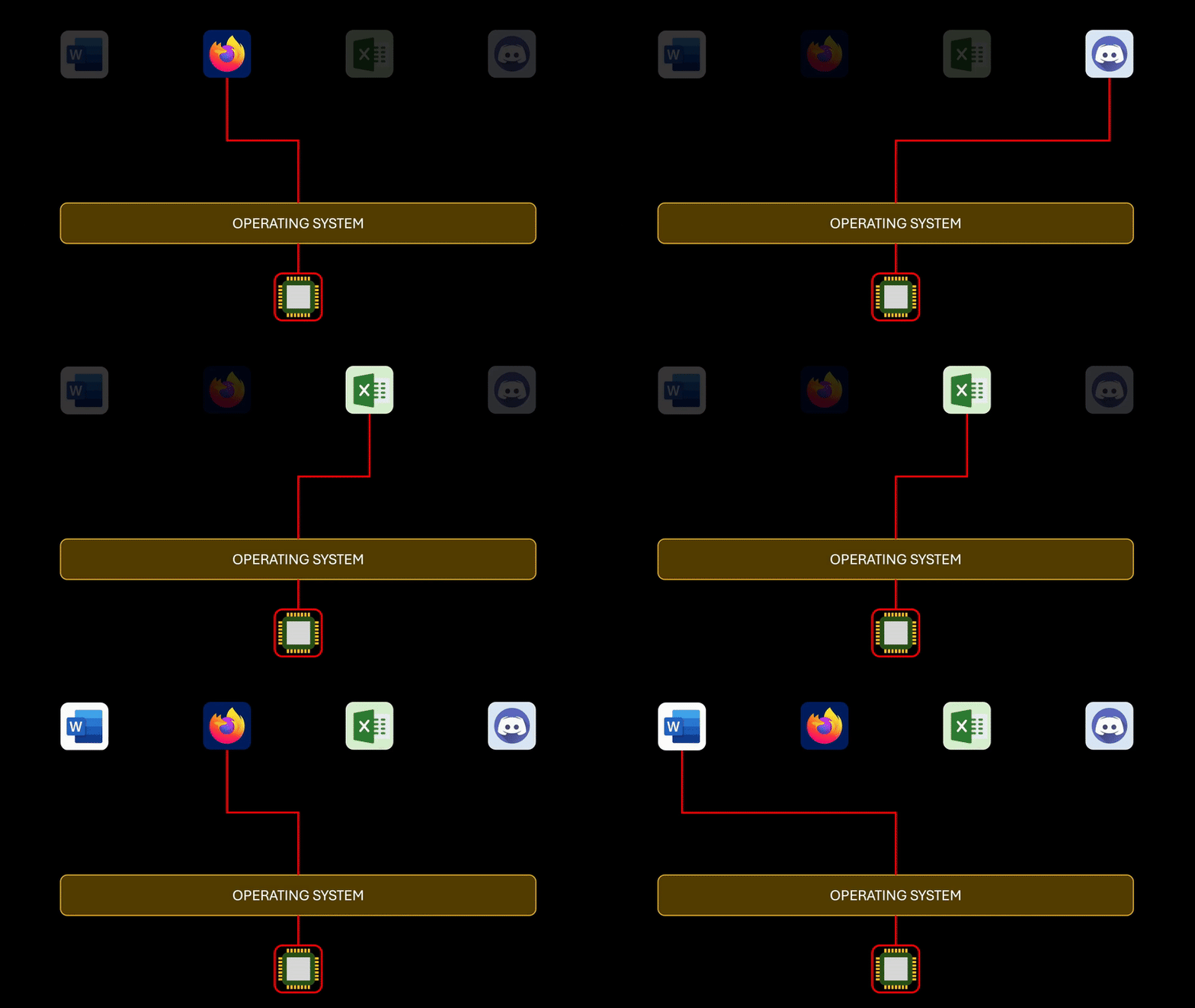
- Multiprogramming organizes jobs so CPU always has one to execute
--
- A subset of jobs is kept in memory
- Job scheduling selects and runs one job at a time
- When a job waits (e.g., for I/O), OS switches to another job
--
--

Time Sharing (Multitasking)
-
Logical extension in which CPU switches jobs so frequently that users can interact with each job while it is running, creating interactive computing
-
Response time should be < 1 second
-
Each user has at least one program executing in memory → process
-- -
If several jobs ready to run at the same time → CPU scheduling
-
If processes don’t fit in memory, swapping moves them in and out to run
-
Virtual memory allows execution of processes not completely in memory
--

Operating-System Operations
- Interrupt-driven: hardware and software
- Hardware interrupt: generated by devices
- Software interrupt (exception/trap):
- Software errors (e.g., division by zero)
- Requests for OS services
- Other process issues: infinite loops, processes modifying each other or the OS
--

--
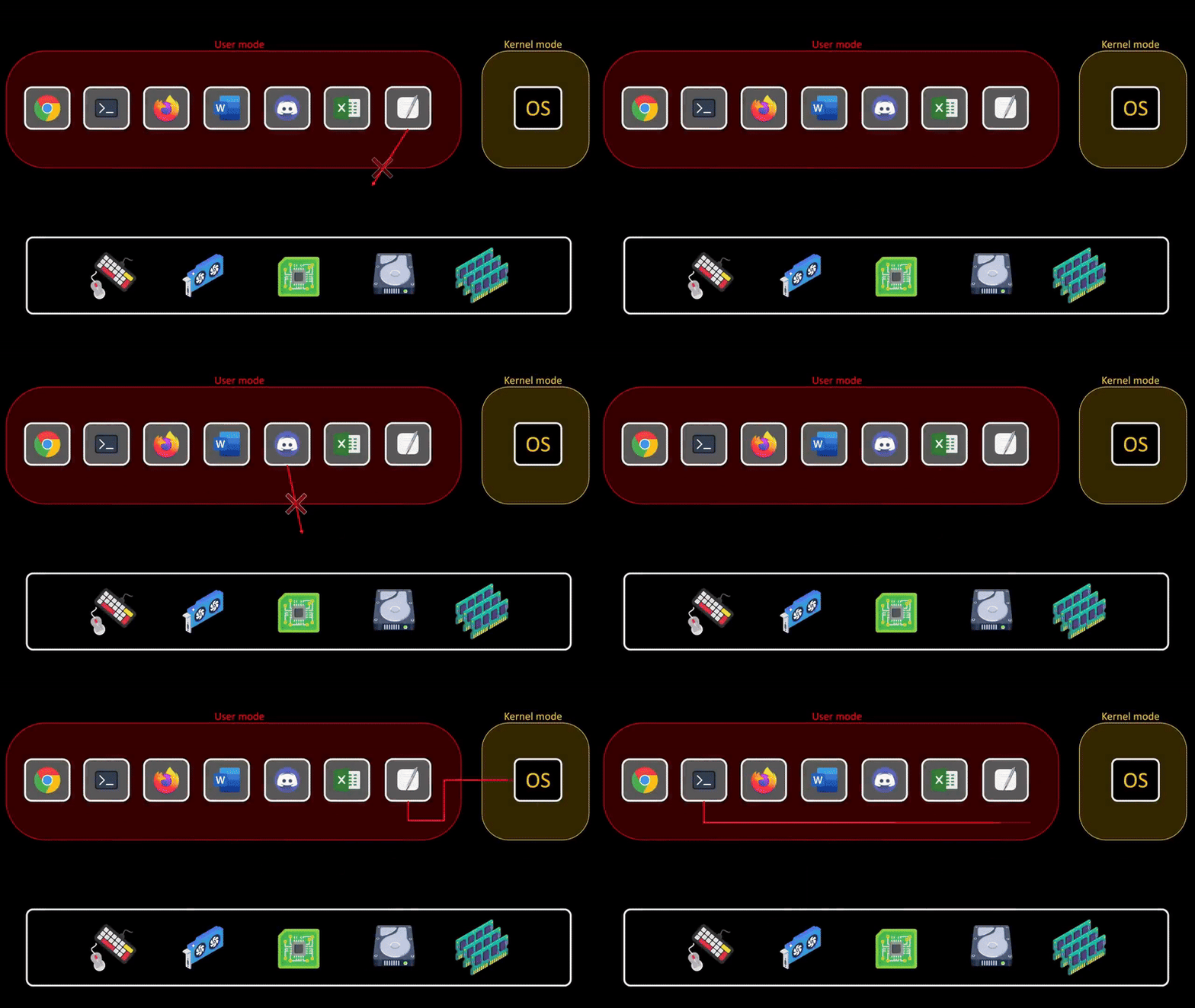
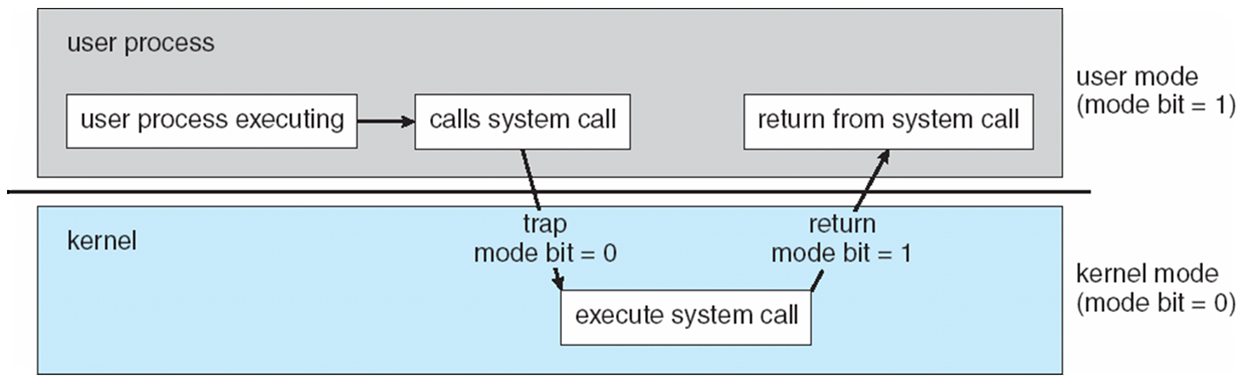
Dual-Mode Operation
- Allows OS to protect itself and other system components
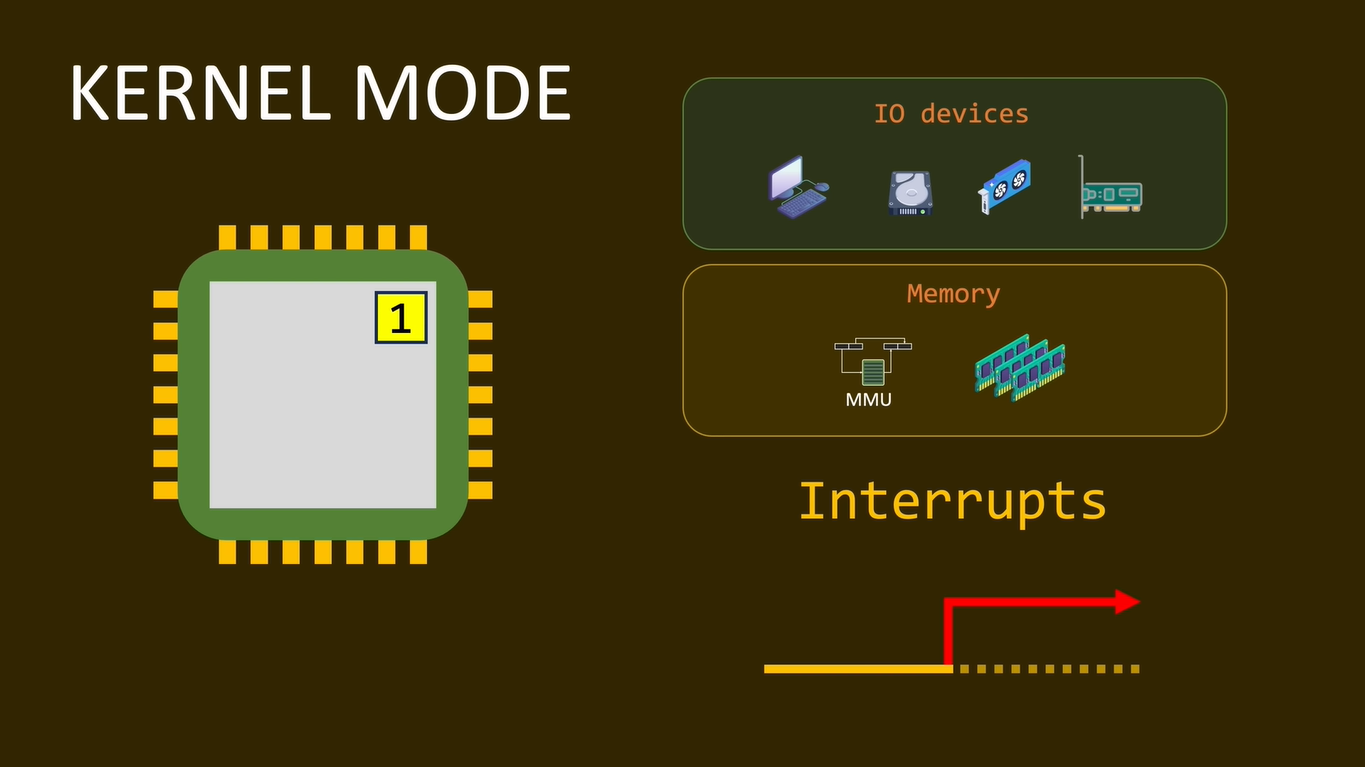
- Two modes: User mode and Kernel mode
- Mode bit provided by hardware to distinguish user vs. kernel execution
- Some instructions are privileged, only executable in kernel mode
--
- System call switches mode to kernel; return resets to user
- Modern CPUs support multi-mode operations
- Example: Virtual Machine Manager (VMM) mode for guest VMs
--

--
--
--
--
Timer in Operating Systems
- Prevents infinite loops and processes hogging resources
- Timer set to interrupt after a defined time period
- Uses a counter decremented by the physical clock
- OS sets the counter (privileged instruction)
- When counter reaches zero → interrupt generated
- Ensures OS can regain control or terminate long-running processes
--

Computing Environments
--
Traditional Computing
- Single-user or batch systems
- Centralized processing on mainframes or PCs
- Jobs executed sequentially, often non-interactive
--
Mobile Computing
- Supports computing on handheld or portable devices
- Enables wireless connectivity, mobility, and anytime access
- Applications optimized for battery and resource constraints
--
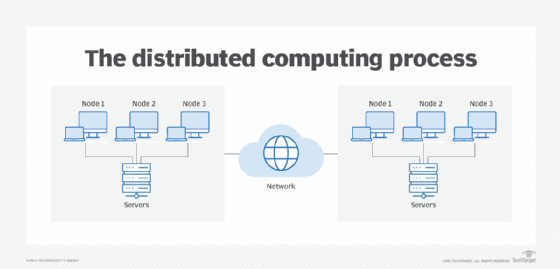
Distributed Computing
- Multiple systems work together over a network
- Share resources and collaborate on tasks
- Provides scalability, fault tolerance, and parallel processing
--
--
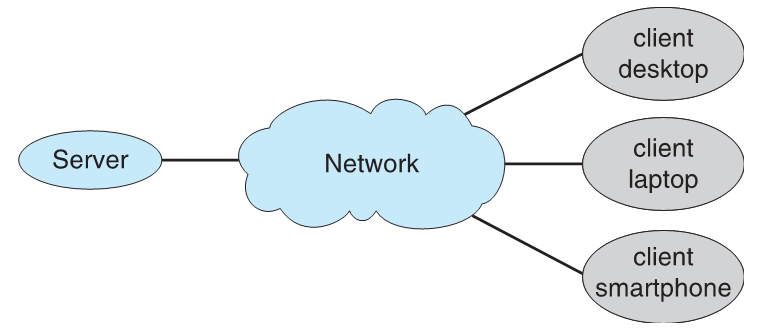
Client-Server Computing
- Clients request services; servers provide them
- Centralized control with multiple clients accessing shared resources
- Common in business applications and web services
--
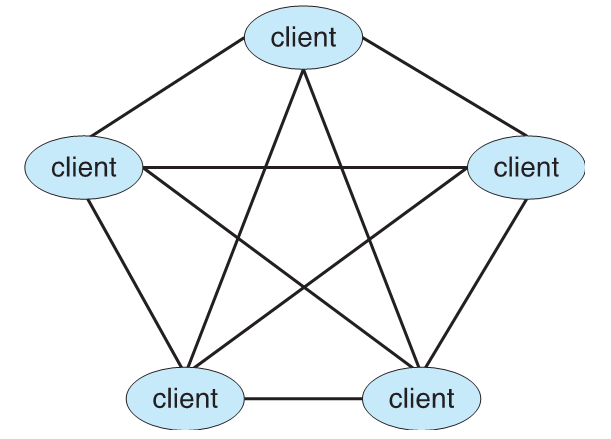
Peer-to-Peer (P2P) Computing
- All nodes act as both clients and servers
- Resources and services shared directly among peers
- Examples: file-sharing networks, blockchain networks
--
--
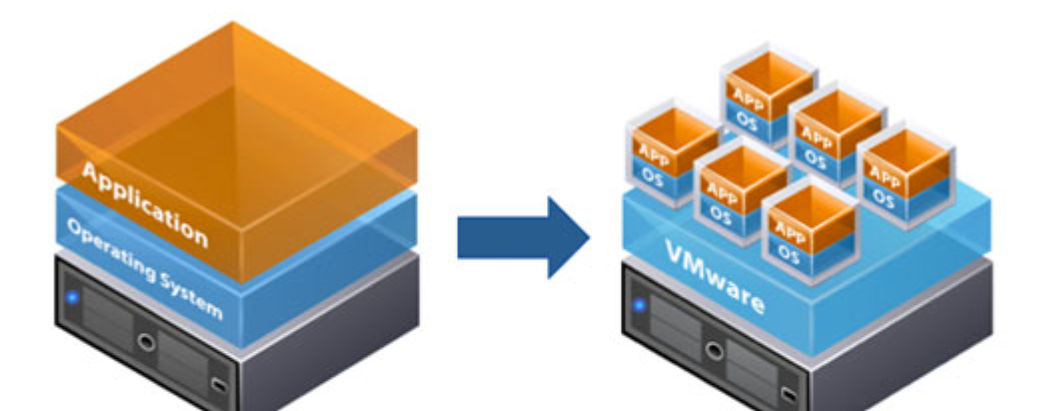
Virtualization
- Creates virtual versions of hardware, OS, storage, or networks
- Allows multiple VMs on a single physical host
- Improves resource utilization and isolation
--

Cloud Computing
- On-demand access to compute, storage, and applications over the internet
- Provides scalability, pay-as-you-go models, and remote accessibility
- Types: IaaS, PaaS, SaaS
--

--
Real-Time & Embedded Systems
- Designed to respond to events within strict timing constraints
- Embedded in devices like sensors, controllers, and industrial machines
- Critical in applications like automotive, medical, and avionics systems
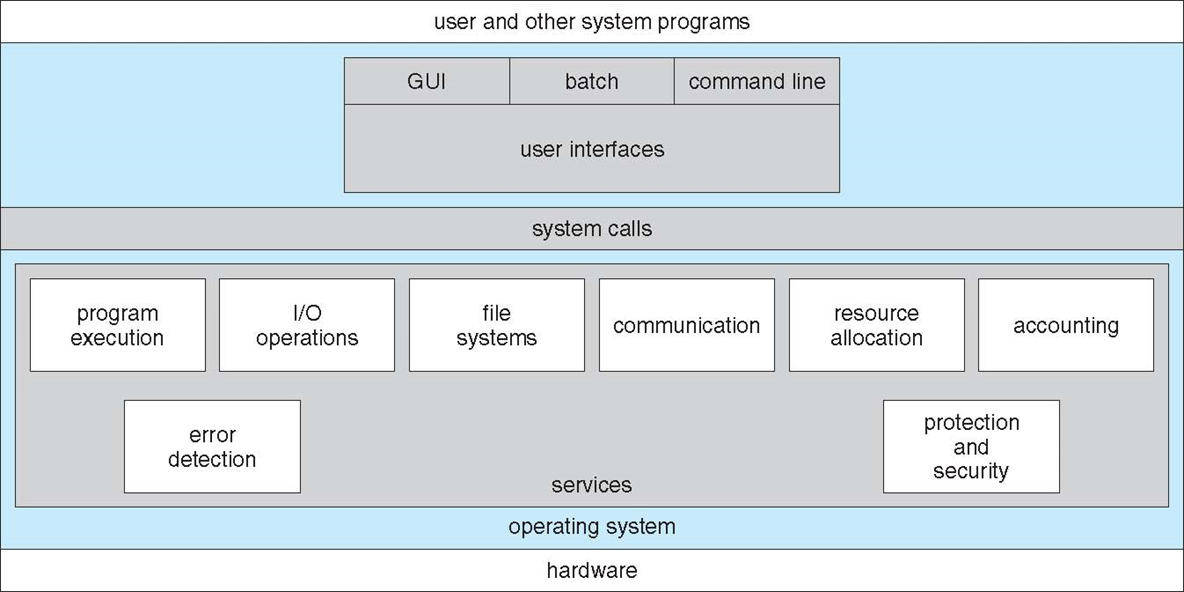
Operating System Services
--
User-Oriented Services
- User Interface (UI): CLI, GUI, or batch
- Program Execution: load, run, and terminate programs
- I/O Operations: access files or I/O devices
- File-System Manipulation: read/write files, create/delete directories, permissions, search, listing
- Communications: exchange information via shared memory or message passing
- Error Detection: monitor CPU, memory, I/O, and user programs; ensure consistent computing
- Debugging Facilities: assist users and programmers
--
System-Oriented Services
- Resource Allocation: assign CPU, memory, storage, I/O devices to concurrent users/jobs
- Accounting: track user resource usage
- Protection & Security:
- Control access to resources
- Prevent interference among processes
- User authentication and protection from external threats
--
System Calls
Programming Interface to OS Services
High-level languages like C/C++ provide interfaces to OS services.
Programs usually use an Application Programming Interface instead of calling system calls directly.
--
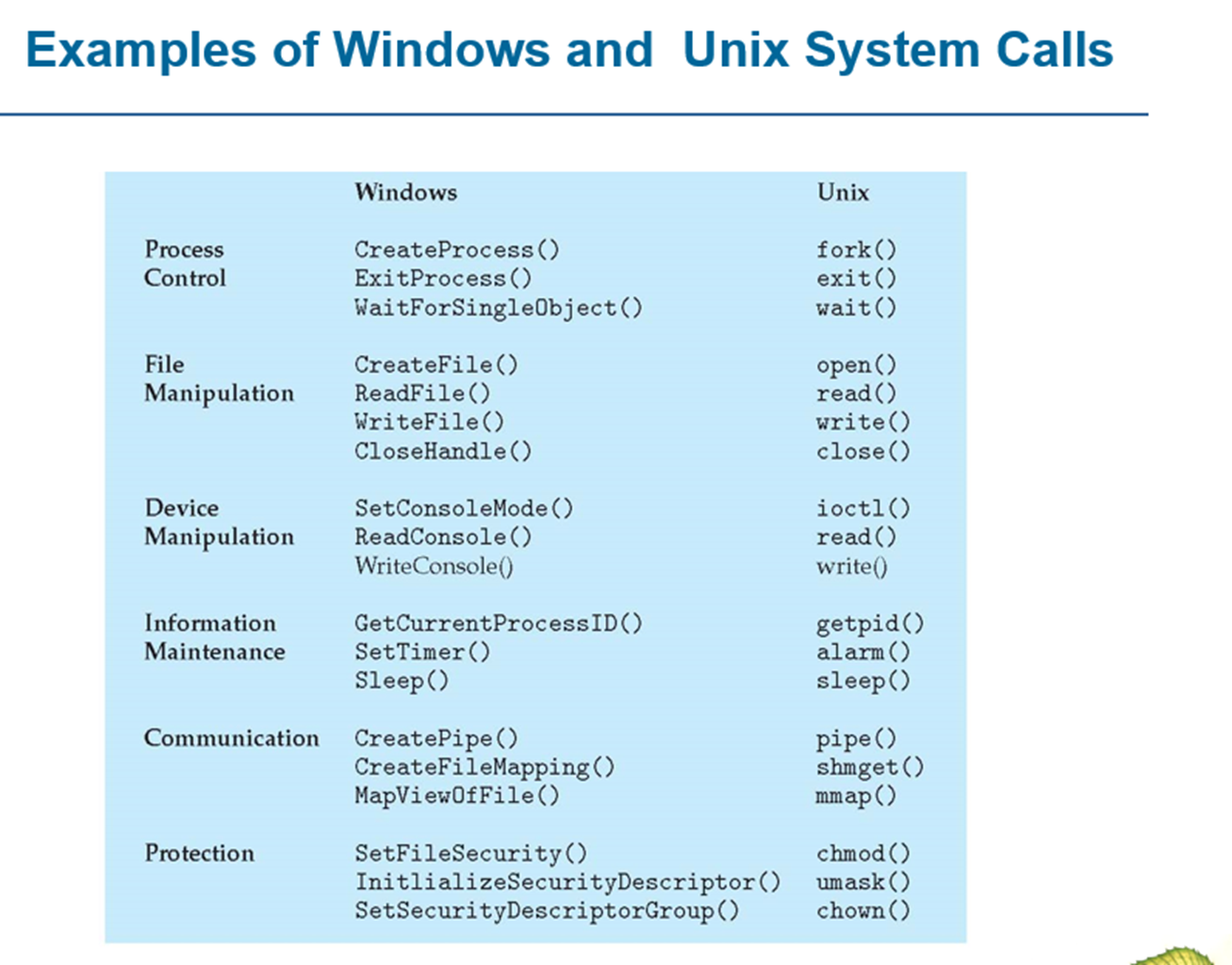
Access via APIs
APIs offer easier function calls and abstractions, reducing complexity and improving portability across systems.
--
Common APIs
Win32 API for Windows systems
POSIX API for UNIX/Linux/Mac OS X
Java API for programs running on the JVM
--
Example
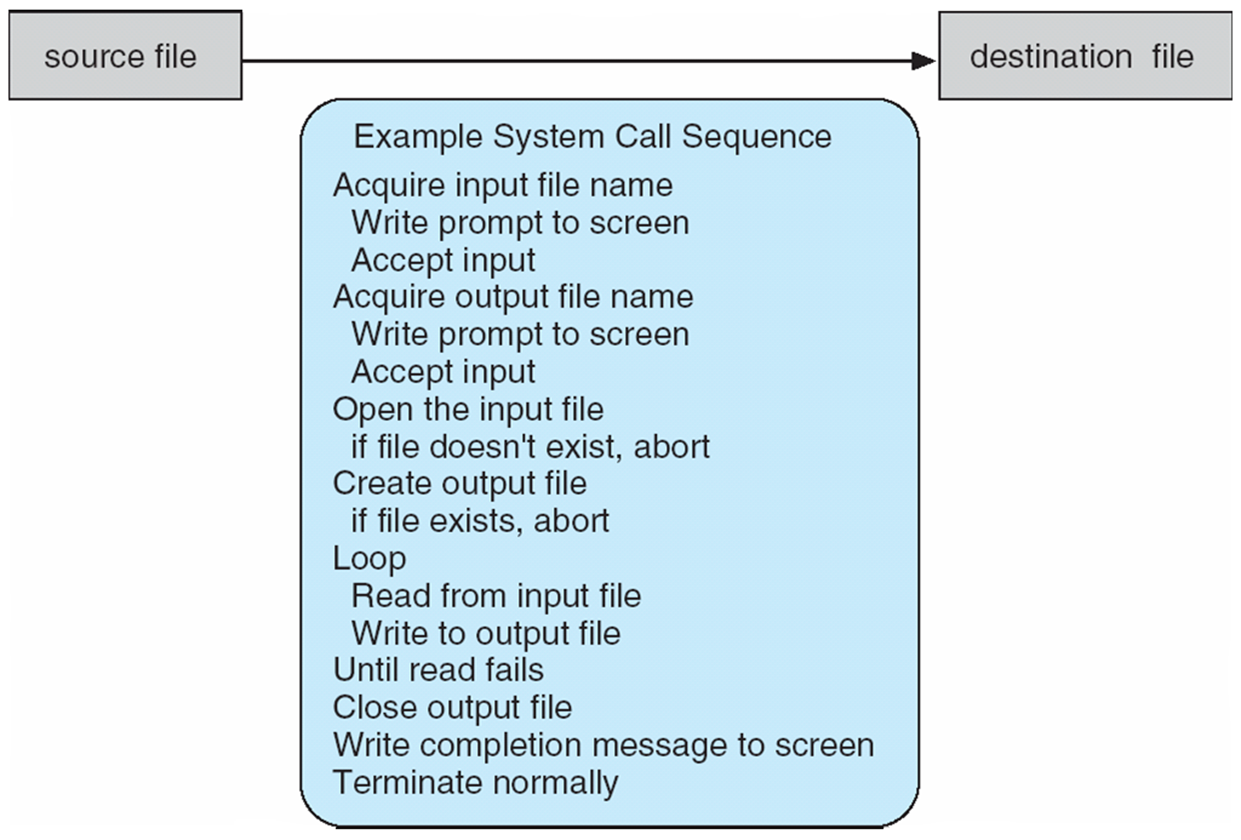
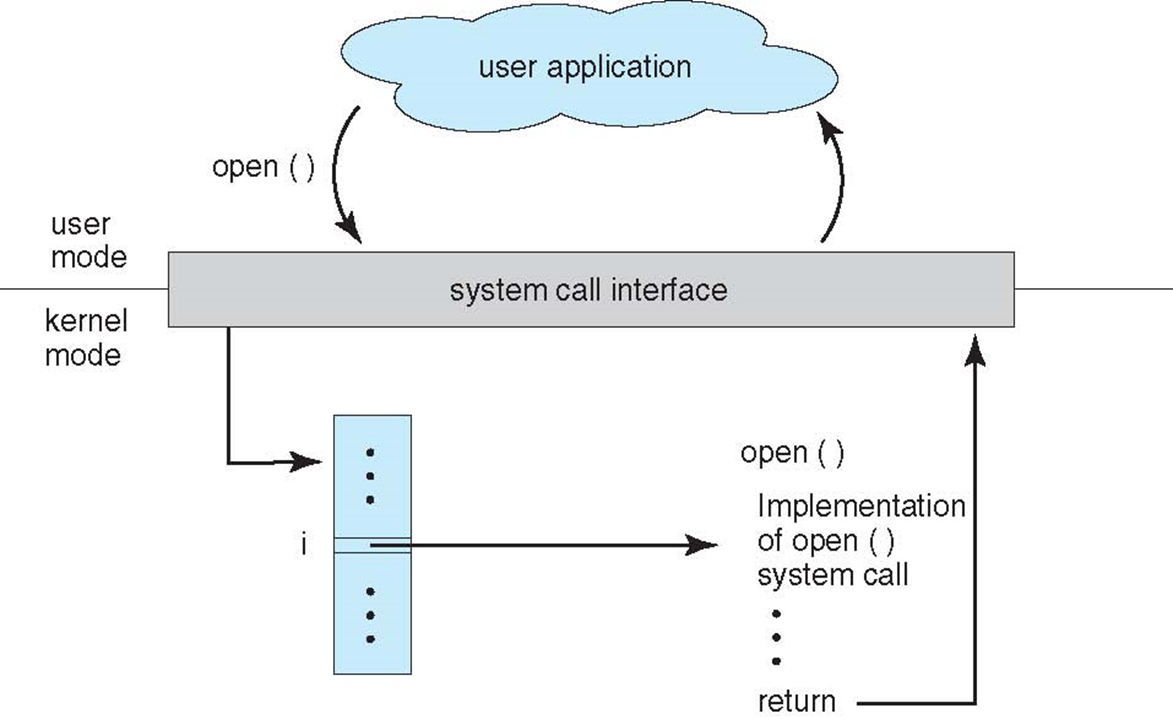
System Call Mapping
Unique Call Numbers
Each system call has a specific number used to index a system-call table.
--
System Call Interface
Lookup and Execution
The system-call interface checks the table and invokes the corresponding kernel function.
It returns the status and any output produced by the call.
--
Programmer View
No Need to Know Internal Implementation
The programmer only needs to follow the API and understand the OS behavior.
Internal mechanics of the system call remain hidden.
--
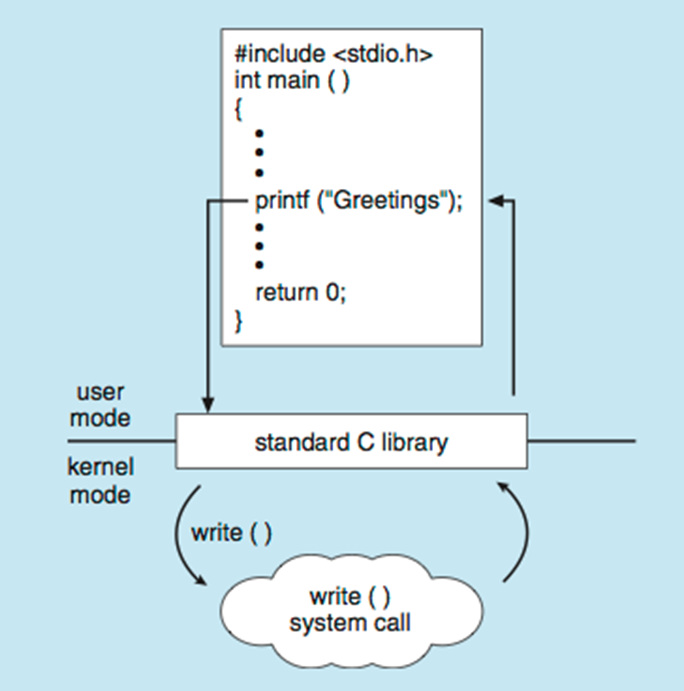
API Abstraction
Run-Time Support Library
Most interaction with the OS is managed by a run-time support library that comes with the compiler.
C Program invoking printf()
Operating System Structure
A general-purpose operating system is a very large program.
Different structural approaches include:
- Simple structure (e.g., MS-DOS)
- More complex monolithic structure (e.g., UNIX)
- Layered design providing abstraction
- Microkernel design (e.g., Mach)
--
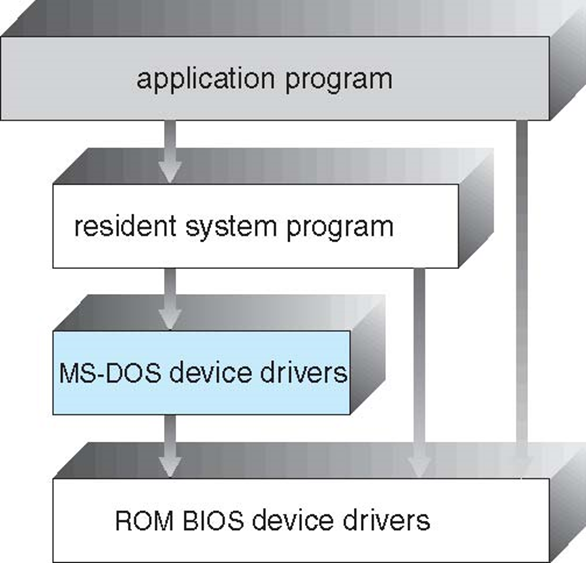
MS-DOS Structure
Design Goal
MS-DOS was created to offer maximum functionality using minimal space.
--
Lack of Modularity
Organization
It was not divided into separate, well-defined modules.
--
Interface Characteristics
Poor Separation
Although some structure exists, the interfaces and functionality levels are not clearly separated.
--
--
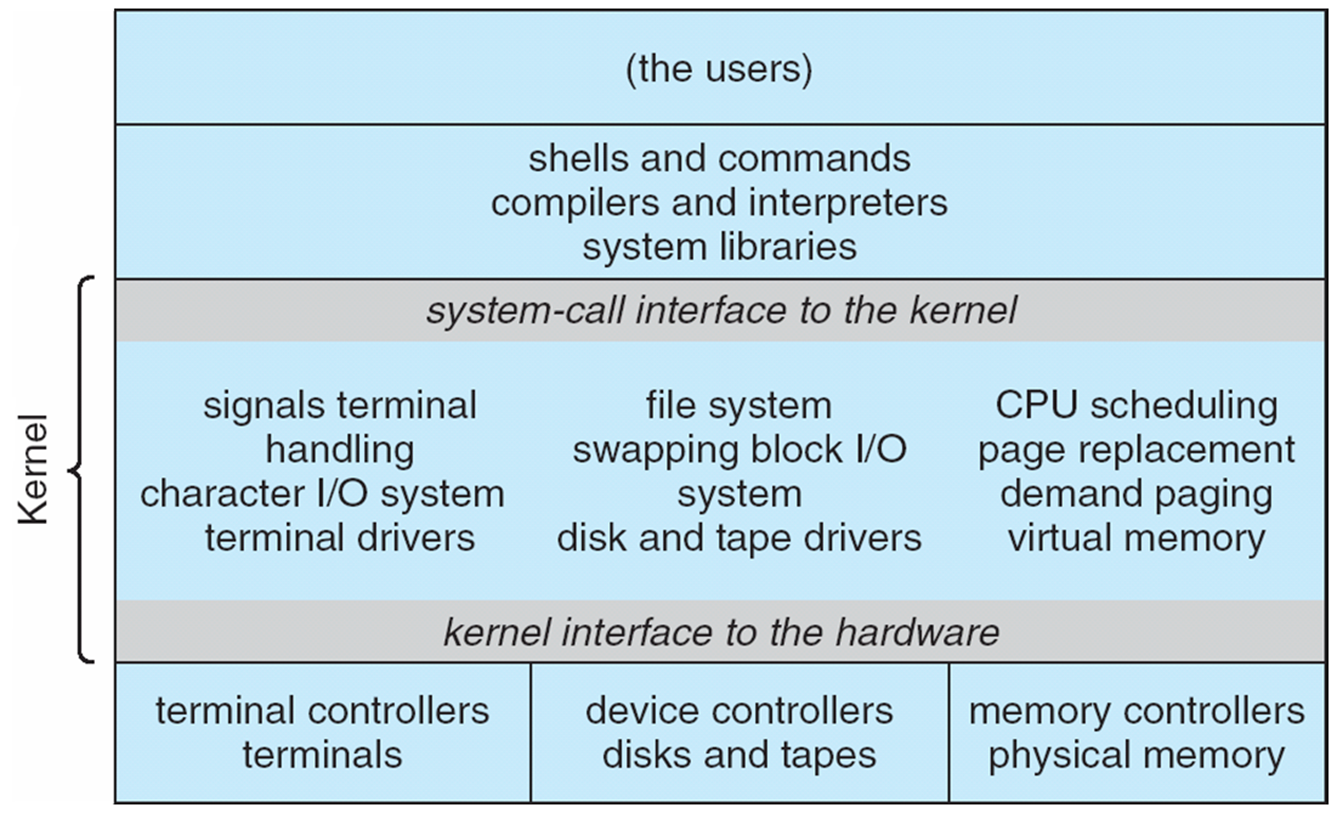
Linux System Structure / Architecture
Gary Kildall
Early Background
Gary Kildall was an American computer scientist and pioneer of personal computing.
He created CP/M, the first widely adopted OS for microcomputers.
--
CP/M and Innovation
Breakthrough
CP/M provided a standard OS interface for early 8-bit machines.
It inspired future OS designs, including MS-DOS.
--
IBM Visits Digital Research
Missed Meeting
In 1980, IBM approached Digital Research to license CP/M for its upcoming PC.
A meeting failed due to scheduling and contract disagreements.
--
Microsoft Steps In
Bill Gates’ Opportunity
With no agreement from Digital Research, IBM turned to Microsoft.
Microsoft acquired QDOS, modified it, and delivered what became MS-DOS.
--
Why I Mentioned
Kildall is often discussed when explaining MS-DOS because:
- CP/M was its inspiration
- A single failed business deal changed the course of computing history
--

--

--

--

What is a Process?
- A process is a program that is currently being executed.
- Its execution moves step-by-step in a sequential flow.
--
Program vs Process
Program
- Passive
- Stored on disk as an executable file
Process - Active in memory
- Has registers, stack, resources, etc.
--
When Does a Program Become a Process?
- When the executable file is loaded into memory.
- Operating system creates a process structure for it.
--
Multiple Processes from One Program
- The same program may run multiple times.
- Each execution is a different process.
- Example: Many users running the same application independently.

Process States
- As a process runs, its state changes.
- Typical states used by operating systems.
--
Process States
- New: Process is being created
- Running: Instructions are being executed
- Waiting: Waiting for an event
- Ready: Waiting for CPU assignment
- Terminated: Execution completed
--


--
Process Control Block (PCB) contains Information associated with each process (also called task control block)
--
•Process state – running, waiting, etc
•Program counter – location of instruction to next execute
• CPU registers – contents of all process centric registers
•CPU scheduling information- priorities, scheduling queue pointers
--
•Memory-management information – memory allocated to the process
•Accounting information – CPU used, clock time elapsed since start, time limits
•I/O status information – I/O devices allocated to process, list of open files
--

CPU Scheduling Basics
- Aim: maximize CPU usage by fast process switching
- Scheduler chooses the next process for CPU
- Processes move between different queues
--
Scheduling Queues
- Job queue: all system processes
- Ready queue: processes in memory waiting for CPU
- Device queues: processes waiting for I/O
--

--
Short-Term Scheduler
- Chooses the next process for the CPU
- Allocates processor time
- Often the only scheduler in simple systems
- Runs very frequently (milliseconds), must be fast
--
Long-Term Scheduler
- Decides which processes enter the ready queue
- Runs much less often (seconds or minutes)
- Can afford slower decision-making
--
Types of Processes
- I/O-bound: spends more time performing input/output, many short CPU bursts
- CPU-bound: spends most time computing, few long CPU burst.
CPU Scheduling Metrics
--
Turnaround Time
Time a process takes from arrival to completion.
Formula:
Turnaround time = Completion time − Arrival time
--
Waiting Time
Time a process waits in the ready queue before CPU execution.
Formula:
Waiting time = Turnaround time − Burst time
--
Average Waiting Time
Average time all processes spend waiting in the ready queue.
Formula:
Average waiting time = (Total waiting time of all processes) / (Number of processes)
--
Response Time
Time from process arrival until its first CPU execution.
Formula:
Response time = Start time − Arrival time
--
Throughput
Number of processes completed per unit time.
Formula:
Throughput = Number of processes completed / Total execution time
Q1
| Process | Arrival Time | Burst Time |
|---|---|---|
| P1 | 0 | 5 |
| P2 | 2 | 3 |
| P3 | 4 | 7 |
| P4 | 6 | 2 |
--
Q2
| Process | Arrival Time | Burst Time |
|---|---|---|
| P1 | 1 | 4 |
| P2 | 3 | 6 |
| P3 | 5 | 2 |
| P4 | 7 | 8 |
--
Q3
| Process | Arrival Time | Burst Time |
|---|---|---|
| P1 | 0 | 9 |
| P2 | 1 | 5 |
| P3 | 3 | 1 |
| P4 | 4 | 4 |
--
Q4
| Process | Arrival Time | Burst Time |
|---|---|---|
| P1 | 2 | 6 |
| P2 | 4 | 3 |
| P3 | 5 | 9 |
| P4 | 8 | 2 |
--
Q5
| Process | Arrival Time | Burst Time |
|---|---|---|
| P1 | 0 | 8 |
| P2 | 1 | 2 |
| P3 | 3 | 5 |
| P4 | 6 | 4 |
Deadlock
Multiple Processes
Several processes run concurrently and compete for limited resources.
--
Resource Requests
A process asks for resources.
If unavailable, it moves to a wait state.
--
Wait State Issue
A waiting process may stay stuck if the resources it needs are held by other waiting processes.
--
Result
Processes may never resume — a situation that can lead to deadlock.
System Model
--
Resource Request Rule
A process must request a resource before using it and release it after use.
--
Resource Limits
A process cannot request more instances of a resource than the system actually has.
--
Example
If the system has 2 printers, no process can request 3 printers.
Deadlock Characterization
--
Deadlock occurs when processes are stuck waiting for resources held by each other, with no progress possible.
--
Four Necessary Conditions
- Mutual Exclusion – Resources are non-shareable.
- Hold and Wait – A process holds one resource and waits for another.
- No Preemption – Resources cannot be forcibly taken away.
- Circular Wait – A circular chain of processes exists, each waiting for a resource held by the next.
Resource Allocation Graph
--
Definition
A deadlock can be represented using a directed system resource-allocation graph.
--
Graph Structure
The graph has:
- Vertices (V)
- Edges (E)
--
Vertex Types
Vertices are divided into two sets:
- P = {P1, P2, …, Pn} → all active processes
- R = {R1, R2, …, Rm} → all resource types
--
Request Edge
Pi → Rj
Process Pi has requested resource Rj and is waiting for it.
--
Assignment Edge
Rj → Pi
An instance of resource Rj is allocated to process Pi.
--
Edge Types
- Pi → Rj → Request edge
- Rj → Pi → Assignment edge
--
Process

--
Resource Type with 4 instances

--
Pi requests instance of Rj

--
Pi is holding an instance of Rj

--

--
RAG with deadlock

--
Graph With A Cycle But No Deadlock

--
Methods for Handling Deadlocks
--
1. Prevention / Avoidance
Use protocols that ensure the system never enters a deadlock state. (before occurance)
--
2. Detection & Recovery
Allow deadlocks to occur, then detect and recover from them. (after occurance)
--
3. Ignore Deadlocks
Ignore the problem and pretend that deadlocks never occur in the system; used by most operating systems, including UNIX
Deadlock Prevention
Restrain the ways request can be made
--
-
Mutual Exclusion – not required for sharable resources (e.g., read-only files); must hold for non-sharable resources
-- -
Hold and Wait – must guarantee that whenever a process requests a resource, it does not hold any other resources
- Require process to request and be allocated all its resources before it begins execution, or allow process to request resources only when the process has none allocated to it.
- Low resource utilization; starvation possible
--
-
No Preemption –
- If a process that is holding some resources requests another resource that cannot be immediately allocated to it, then all resources currently being held are released
--
- If a process that is holding some resources requests another resource that cannot be immediately allocated to it, then all resources currently being held are released
-
Preempted resources are added to the list of resources for which the process is waiting
-
Process will be restarted only when it can regain its old resources, as well as the new ones that it is requesting
-- -
Circular Wait – impose a total ordering of all resource types, and require that each process requests resources in an increasing order of enumeration
Deadlock Avoidance
Requires that the system has some additional a priori information available
--
- Simplest and most useful model requires that each process declare the maximum number of resources of each type that it may need
--
- The deadlock-avoidance algorithm dynamically examines the resource-allocation state to ensure that there can never be a circular-wait condition
--
- Resource-allocation state is defined by the number of available and allocated resources, and the maximum demands of the processes
--
- For example, in a system with one tape drive and one printer, we might be told that process P will request first the tape drive, and later the printer, before releasing both resources. Process Q, on the other hand, will request first the printer, and then the tape drive.
--
Safe state
When a process requests an available resource, system must decide if immediate allocation leaves the system in a safe state
--
- If a system is in safe state -> no deadlocks
- If a system is in unsafe state -> possibility of deadlock
- Avoidance -> ensure that a system will never enter an unsafe state.
--
Safe, Unsafe, Deadlock State

--
Single instance of a resource type
- Use a resource-allocation graph
Multiple instances of a resource type
- Use the banker’s algorithm
--
Banker's algorithm
Q1
Total resources = (A=11, B=6, C=9, D=7)

--
Q2
Available = (A = 3, B = 2, C = 1, D = 2)

Refer https://os.surajgowda.in/scheduling-algo to verify answers